

Implementing PostgreSQL Row-Level Security in Production
#EP 32 | A single forgotten filter exposed customer data across tenants.

One support ticket: “Why can I see Acme Corp’s roadmap?”
You check the logs. Your stomach drops. That missing WHERE clause? It’s been in production for three weeks.
One missing WHERE clause turned into a data breach incident. Welcome to the exact problem Row-Level Security (RLS) was built to solve.
TL;DR for the Impatient
Row-Level Security (RLS): Authorization enforced at the database level, not application code
Problem: Forgot a WHERE clause in a query → users see other companies’ data → data breach incident
Solution: Enable RLS policies in PostgreSQL → database automatically filters rows based on user context → even if your application code has bugs, the database blocks unauthorized access
The catch: Index your policy columns or queries slow to 500ms. Use session-level connection pooling or context variables don’t persist. Keep policies simple or the query planner melts down.
The move: Start with one table, one policy. Ship it. Watch what breaks. Fix indexes. Then expand.
When There’s No Bouncer on the Door
Let’s get specific. You’re building a project management tool. Your tasks table looks like this:
CREATE TABLE tasks (
  id UUID PRIMARY KEY,
  title TEXT,
  user_id UUID,  -- who owns this task
  team_id UUID   -- which team it belongs to
);
In your application code, you write queries like:
SELECT * FROM tasks
WHERE team_id = $1 AND user_id = $2;
You’re filtering by team_id and user_id in every query. Manually. In every controller. In every service. In every background job.
Here’s what goes wrong:
A junior dev writes a new feature and forgets the WHERE clause. Now users can see each other’s tasks—compounded by the fact that no one catches it in code review because RLS wasn’t in place to prevent it at the database level.
A complex join accidentally drops the filter condition, exposing data from other teams. This type of bug is especially insidious because it might only appear under specific query conditions, making it hard to catch in testing.
A database admin runs an analysis query in production and dumps sensitive data to a CSV. Without RLS, even read-only access becomes a security liability.
An SQL injection vulnerability bypasses your application-layer checks entirely.
The core problem: authorization lives in your app code. The data lives in Postgres. That gap is where leaks happen.
Let the Database Be the Bouncer
RLS moves authorization into the database. PostgreSQL enforces policies on every query — even admin tools, background jobs, and that CSV your analyst just exported.
If you’re still hand-rolling filters in every service, you’re paying interest on future incidents.
The mechanism:
You define policies directly on tables
PostgreSQL checks those policies before returning rows
If a policy fails, those rows don’t exist (from the query’s perspective)
This happens transparently — your application code doesn’t change
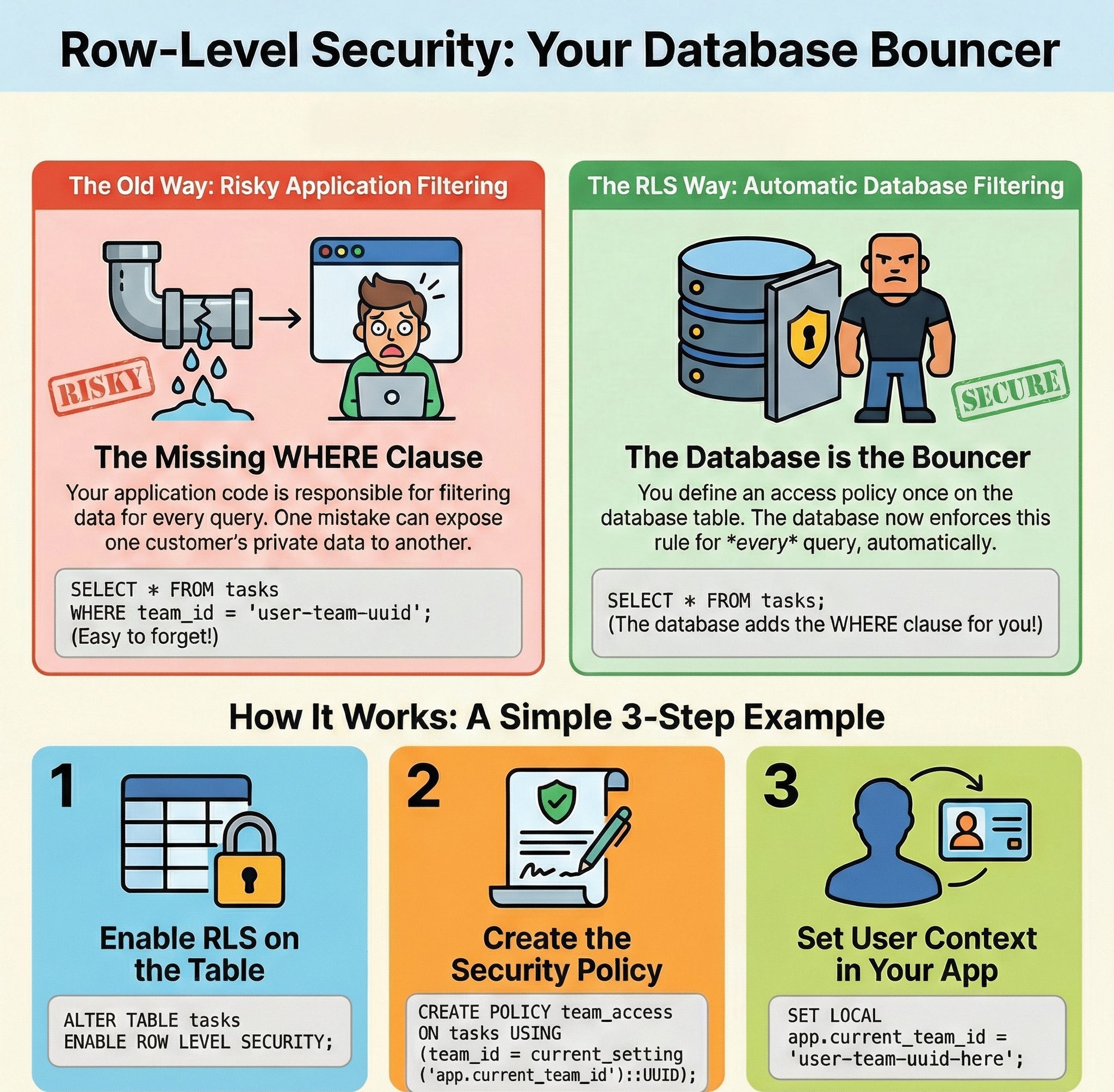
It’s like having a bouncer at every table who checks credentials before serving results. The bouncer can’t be bypassed, even if your application code has bugs.
How to Implement RLS (The Minimal Setup)
Here’s the minimal useful setup we’ve actually shipped in real systems.
The entire setup is three SQL statements. The hard part isn't the code—it's knowing when your database will suddenly hate you.
Step 1: Enable RLS on the table
ALTER TABLE tasks ENABLE ROW LEVEL SECURITY;Without policies, this locks down everything. No one can read or write. (Including your application. Don’t skip step 2.)
Step 2: Define a policy
CREATE POLICY team_isolation ON tasks
  FOR SELECT
  USING (team_id = current_setting('app.current_team_id')::UUID);
This policy says: “Users can only SELECT rows where the task’s team_id matches the session’s app.current_team_id setting.”
Step 3: Set the session variable in your application
When a user authenticates, your app sets the session context:
SET LOCAL app.current_team_id = 'user-team-uuid-here';Now every query in that session automatically filters by team_id. Your application code simplifies to:
SELECT * FROM tasks; -- No WHERE clause needed!PostgreSQL handles the filtering. The policy is enforced even if:
You forget to add filters
An ORM generates bad SQL
Someone connects directly to the database
A background job runs with elevated privileges (if configured correctly)
How Teams Actually Roll Out RLS (Without Taking Prod Down)
Here’s how teams actually deploy RLS in production:
1. Start with read policies
Lock down SELECT first. This prevents data leaks without risking write failures.
CREATE POLICY read_own_team ON tasks
  FOR SELECT
  USING (team_id = current_setting('app.current_team_id')::UUID);
2. Add write policies incrementally
Once read policies are stable, add INSERT, UPDATE, DELETE policies:
CREATE POLICY write_own_team ON tasks
  FOR ALL
  USING (team_id = current_setting('app.current_team_id')::UUID)
  WITH CHECK (team_id = current_setting('app.current_team_id')::UUID);
The USING clause checks existing rows. The WITH CHECK clause validates new/modified rows.
3. Handle admin/system access
Create a separate database role with BYPASSRLS permission for background jobs and admin tools:
CREATE ROLE system_admin BYPASSRLS;Grant this role sparingly. Document every use.
4. Monitor policy performance
Use EXPLAIN ANALYZE on your most common queries. Look for:
Sequential scans that should be index scans
Policy checks that are too complex
Joins that explode due to policy filtering
When RLS Blows Up (And How to Avoid It)
Here's what breaks when you ship RLS to production:
Problem 1: Index hell
Your policies add implicit
WHEREclauses to every query. If those columns aren’t indexed, full table scans happen.If queries suddenly go from 5ms to 500ms right after enabling RLS, assume “missing index on policy column” before blaming Postgres. 9 times out of 10, it’s that.
Solution: Add indexes for every column referenced in RLS policies. For our example:
CREATE INDEX idx_tasks_team_id ON tasks(team_id);Problem 2: Policy complexity compounds
Multiple policies on the same table use
ORlogic. Three policies mean:(policy1) OR (policy2) OR (policy3). This can confuse the query planner.Solution: Keep policies simple. Prefer fewer, broader policies over many narrow ones. Use
USINGclause logic that the planner can optimize (equality checks are best).Problem 3: Session variable overhead
Setting
app.current_team_idon every request adds latency (small, but measurable).Solution: Use connection pooling strategically. Consider setting session variables once per connection if your app architecture allows it. PgBouncer in transaction mode won’t work here — you need session-level pooling.
You've probably written at least two of these bugs. I've written all four. 😎
Know Your Limits: When RLS Isn’t the Answer
RLS solves authorization at the row level. It doesn’t solve:
1. Column-level permissions
If different users in the same team should see different columns (e.g., salary data), RLS won’t help. You need views or application-layer filtering.
2. Complex cross-table authorization
Policies that require joins across multiple tables get messy fast. PostgreSQL can do it, but the performance hit is real.
3. Dynamic, frequently-changing rules
If your authorization logic changes based on time of day, user subscription tier, or external API calls, encoding that in SQL policies becomes unwieldy.
4. Non-PostgreSQL databases
RLS is well-supported in PostgreSQL, MySQL 8.0+, and some cloud databases (Supabase, Neon). If you’re on DynamoDB, MongoDB, or older MySQL, you’re building this yourself.
Understand your database’s RLS capabilities before committing: PostgreSQL and MySQL 8.0+ have solid implementations, but cloud databases like Supabase and Neon wrap PostgreSQL’s RLS beautifully. For DynamoDB, MongoDB, and Firestore, you’re implementing this in your application layer—significantly more complex and error-prone.
What This Means For Your System Design
Anti-pattern: RLS-as-framework
Don’t build a meta-RLS layer with 10 tables of rules before you’ve shipped one simple policy.
Don’t hide all policies behind an internal DSL “for flexibility”.
Don’t start with cross-table, join-heavy policies; they will wreck your query planner and your weekend.
Don’t assume RLS alone replaces API-layer authorization checks. RLS protects data at the database level, but you still need application-level checks for feature access, role-based permissions, and user-facing authorization.
Instead: Ship one table, one policy, one index. Then evolve.
Immediate implications:
Your application code gets simpler (fewer WHERE clauses)
Authorization bugs become less likely (the database enforces rules)
Direct database access becomes safer (policies always apply)
Longer-term considerations:
Database performance tuning becomes more critical (policies affect every query)
Testing requires database-level setup (policies aren’t mocked easily)
Migration complexity increases (changing policies requires coordination)
What to watch next:
How your team handles session variable management (every request needs correct context)
Whether your connection pooler supports session-level state (PgBouncer’s transaction mode won’t work)
If your database CPU usage increases (poorly optimized policies are expensive)
The Unanswered Question
RLS solves the “how do I enforce authorization at the data layer” problem. It doesn’t solve “how do I design authorization rules that make sense.”
You still need to decide: What defines a “team”? Can users belong to multiple teams? What happens when a user switches teams mid-session? How do you handle shared resources?
RLS enforces the rules you define. Defining good rules? That’s still on you.
Ship one table with RLS. Watch what breaks. Then tell me: did your database CPU spike, or did your connection pooler? I'm collecting war stories.
P.S. The first time I enabled RLS in production, queries went from 8ms to 450ms. Turned out I forgot to index the team_id column my policies checked on every query. Three hours of panic, one CREATE INDEX, problem solved. If you're shipping RLS next sprint, reply with your biggest concern—I'm collecting real deployment blockers for a follow-up guide.
Slow apps killing your projects? Grab my Cache Rules Everything: A Developer’s Guide to Faster Applications for pro caching techniques that 10x speed. Get it now. Peek at my top 3 optimization hacks for more dev wins!
Creators: Want to reach an engaged audience of developers? Email me at souravb.1998@gmail.com for collaboration or sponsorship opportunities.
Help Us Shape Core Craft Better
TL; DR: Got 2 minutes? Take this quick survey to tell us who you are, what you care about, and how we can make Core Craft even better for you.
Thank You for Reading!
Loved this? Hit ❤️ to share the love and help others find it!
Get weekly tech insights to code smarter and build your dev career. Subscribe to Core Craft for practical tips and frameworks you can use today.
Have ideas or questions? Drop a comment—I reply to all! For collabs or newsletter sponsorships, email me at souravb.1998@gmail.com
Stay connected: Follow me on X | LinkedIn | YouTube