

HTML vs XML: Differences Simplified for Beginners
#6: HTML vs. XML: A Markup Showdown Simplified!

Have you ever wondered why some web pages look stunning while others focus on organizing data? The secret lies in HTML and XML, two foundational technologies that power the web.
HTML and XML are markup languages but serve very different purposes.
Whether you're a web developer, a data enthusiast, or just curious, understanding the difference between HTML and XML can help you navigate the digital world more effectively. Let’s break it down in simple terms!
Purpose and Functionality
HTML (HyperText Markup Language) is used to create and structure web pages. It defines how content is displayed in a browser, such as text, images, and links.
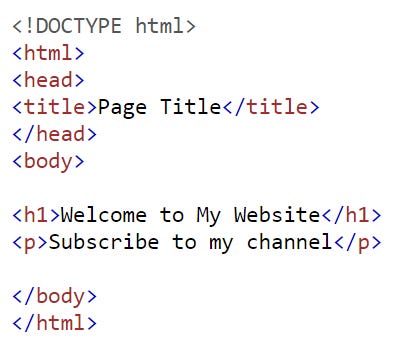
XML (eXtensible Markup Language), on the other hand, is designed to store and transport data. It focuses on what the data is, not how it looks.
Examples:
HTML:
<h1>Welcome to My Website</h1>(displays a heading on a webpage).XML:
<name>John Doe</name>(stores data about a person’s name).
Why It Matters: HTML is essential for building websites, while XML is crucial for data exchange between systems, such as APIs or configuration files.
Structure and Flexibility
HTML has a predefined set of tags (e.g., <p>, <img>, <a>) for specific purposes. XML, however, allows you to create custom tags tailored to your data needs.
Examples:
HTML:
<img src="image.jpg" alt="A beautiful sunset">(displays an image).XML:
<product><name>Laptop</name><price>999</price></product>(defines a product’s details).
Why It Matters: HTML’s rigid structure makes it easy to learn and use for web development, while XML’s flexibility makes it ideal for complex data representation.
Presentation vs Data Storage
HTML is all about presentation. It controls how content looks on a webpage, including fonts, colors, and layouts.
XML, in contrast, is purely about data storage and transport. It doesn’t care about how the data is displayed.
Examples:
HTML:
<p style="color:blue;">This text is blue.</p>(styles text).XML:
<weather><temperature>25</temperature><unit>Celsius</unit></weather>(stores weather data).
Why It Matters: HTML is vital for creating user-friendly interfaces, while XML ensures data is organized and accessible across different platforms.
Compatibility and Use Cases
HTML is primarily used for web development and is supported by all browsers. XML is used in a wide range of applications, from web services to configuration files, and is compatible with many programming languages.
Examples of Use Cases:
HTML: Blogs, e-commerce sites, and portfolios.
XML: RSS feeds, API responses, and document formats like Microsoft Office files.
Why It Matters: Knowing when to use HTML or XML can save time and effort in your projects.
Conclusion
In summary:
HTML is for creating visually appealing web pages, while XML is for storing and transporting data.
HTML has predefined tags, whereas XML allows custom tags.
HTML focuses on presentation, and XML focuses on data organization.
Both HTML and XML are essential in their own ways, and understanding their differences can help you choose the right tool for your needs.
Thank You for Reading!
If you found this article helpful, hit the ❤️ button and consider subscribing for more content every week.
Have questions or suggestions? Leave a comment—I’d love to hear your thoughts!
Stay Connected: Follow me on LinkedIn and X to stay updated with my latest posts.